外观
轻松上手WebSocket及时通信
来源:语雀原文 | 整理日期:2026-09-22
轻松上手WebSocket及时通信
最近想起之前一个及时通信系统项目,是关于订阅推送的,当粉丝订阅了大V或者说作者发布的内容被评论和点赞之后,对应的用户会受到通知,当然,本身系统用户并不多,所以直接采用的是轮训的方式,由前端这边定时向后端发起接口请求,获取消息推送,无疑呢,此种方式也可以解决问题,但是大部分请求基本无用,白白浪费带宽和网络资源。
今天给大家分享下,如何快速让微服务中加入 前后端通过websocket实现消息推送的方式。
WebSocket是一种在单个TCP连接上进行全双工通信的协议。WebSocket通信协议于2011年被IETF定为标准RFC 6455,并由RFC7936补充规范。WebSocket API也被W3C定为标准。
WebSocket使得客户端和服务器之间的数据交换变得更加简单,允许服务端主动向客户端推送数据。在WebSocket API中,浏览器和服务器只需要完成一次握手,两者之间就直接可以创建持久性的连接,并进行双向数据传输。
当然,前端这块,主要采用原始的js通过websocket的方式获取消息,在微信公众号和支付宝小程序开发中都有相应的onWebSocekt方式,有兴趣的同学可以自行学习。
废话不多说,开始啃代码。
1、pom.xml
plain
<!--websocket-->
        <dependency>
            <groupId>org.springframework.boot</groupId>
            <artifactId>spring-boot-starter-websocket</artifactId>
        </dependency>


        <!--thymeleaf-->
        <dependency>
            <groupId>org.springframework.boot</groupId>
            <artifactId>spring-boot-starter-thymeleaf</artifactId>
        </dependency>
2、application.yml
plain
server:
  port: 8080


spring:
  thymeleaf:
    cache: false # 开发时关闭缓存,不然没法看到实时页面
    mode: HTML # 用非严格的 HTML
    encoding: UTF-8
    servlet:
      content-type: text/html
3、WebSocketServer,实现前后端的长连接
java
package com.cookie.server;

import org.slf4j.Logger;
import org.slf4j.LoggerFactory;
import org.springframework.stereotype.Component;

import javax.annotation.PostConstruct;
import javax.websocket.*;
import javax.websocket.server.ServerEndpoint;
import java.io.IOException;
import java.util.concurrent.CopyOnWriteArraySet;
import java.util.concurrent.atomic.AtomicInteger;

/**
 * @Author : cxq
 * @Date : 2020/8/31 15:50
 */

// 前端通过该连接与后端保持交互
@ServerEndpoint(value = "/server")
@Component
public class WebSocketServer {

    @PostConstruct
    public void init() {
        System.out.println("websocket 加载");
    }
    private static Logger log = LoggerFactory.getLogger(WebSocketServer.class);
    private static final AtomicInteger OnlineCount = new AtomicInteger(0);
    // concurrent包的线程安全Set,用来存放每个客户端对应的Session对象。
    private static CopyOnWriteArraySet<Session> SessionSet = new CopyOnWriteArraySet<Session>();


    /**
     * 连接建立成功调用的方法
     */
    @OnOpen
    public void onOpen(Session session) {
        SessionSet.add(session);
        int cnt = OnlineCount.incrementAndGet(); // 在线数加1
        log.info("有连接加入,当前连接数为:{}", cnt);
        SendMessage(session, "连接成功");
    }

    /**
     * 连接关闭调用的方法
     */
    @OnClose
    public void onClose(Session session) {
        SessionSet.remove(session);
        int cnt = OnlineCount.decrementAndGet();
        log.info("有连接关闭,当前连接数为:{}", cnt);
    }

    /**
     * 收到客户端消息后调用的方法
     *
     * @param message
     *            客户端发送过来的消息
     */
    @OnMessage
    public void onMessage(String message, Session session) {
        log.info("来自客户端的消息:{}",message);
        SendMessage(session, "收到消息,消息内容:"+message);

    }

    /**
     * 出现错误
     * @param session
     * @param error
     */
    @OnError
    public void onError(Session session, Throwable error) {
        log.error("发生错误:{},Session ID: {}",error.getMessage(),session.getId());
        error.printStackTrace();
    }

    /**
     * 发送消息,实践表明,每次浏览器刷新,session会发生变化。
     * @param session
     * @param message
     */
    public static void SendMessage(Session session, String message) {
        try {
//            session.getBasicRemote().sendText(String.format("%s (From Server,Session ID=%s)",message,session.getId()));
            session.getBasicRemote().sendText(message);
        } catch (IOException e) {
            log.error("发送消息出错:{}", e.getMessage());
            e.printStackTrace();
        }
    }

    /**
     * 群发消息
     * @param message
     * @throws IOException
     */
    public static void BroadCastInfo(String message) throws IOException {
        for (Session session : SessionSet) {
            if(session.isOpen()){
                SendMessage(session, message);
            }
        }
    }

    /**
     * 指定Session发送消息
     * @param sessionId
     * @param message
     * @throws IOException
     */
    public static void SendMessage(String message,String sessionId) throws IOException {
        Session session = null;
        for (Session s : SessionSet) {
            if(s.getId().equals(sessionId)){
                session = s;
                break;
            }
        }
        if(session!=null){
            SendMessage(session, message);
        }
        else{
            log.warn("没有找到你指定ID的会话:{}",sessionId);
        }
    }
}
4、WebSocketController,主要实现消息群发和一对一发送
java
package com.cookie.controller;

import com.cookie.server.WebSocketServer;
import org.springframework.web.bind.annotation.RequestMapping;
import org.springframework.web.bind.annotation.RequestMethod;
import org.springframework.web.bind.annotation.RequestParam;
import org.springframework.web.bind.annotation.RestController;

import java.io.IOException;

/**
 * @Author : cxq
 * @Date : 2020/8/31 16:19
 */

@RestController
@RequestMapping("/webSocket")
public class WebSocketController {


    /**
     * 群发消息内容
     *
     * @param message
     * @return
     */
    @RequestMapping(value = "/sendAll", method = RequestMethod.GET)
    public String sendAllMessage(@RequestParam(required = true) String message) {
        try {
            WebSocketServer.BroadCastInfo(message);
        } catch (IOException e) {
            e.printStackTrace();
        }
        return "ok";
    }

    /**
     * 指定会话ID发消息
     *
     * @param message 消息内容
     * @param id      连接会话ID
     * @return
     */
    @RequestMapping(value = "/sendOne", method = RequestMethod.GET)
    public String sendOneMessage(@RequestParam(required = true) String message,
                                 @RequestParam(required = true) String id) {
        try {
            WebSocketServer.SendMessage(message, id);
        } catch (IOException e) {
            e.printStackTrace();
        }
        return "ok";
    }
}
5、index.html接收后端发送的消息及展示
java
<!DOCTYPE html>
<html lang="en" xmlns:th="http://www.thymeleaf.org">
<head>
    <meta charset="UTF-8">
    <title>websocket测试</title>
    <script src="http://libs.baidu.com/jquery/2.0.0/jquery.min.js"></script>
    <style type="text/css">
        h3,h4{
            text-align:center;
        }
    </style>
</head>
<body>

<h3>WebSocket测试,客户端接收到的消息如下:</h3>

<textarea id = "messageId" readonly="readonly" cols="150" rows="30" >

</textarea>


<script type="text/javascript">
    var socket;
    if (typeof (WebSocket) == "undefined") {
        console.log("遗憾:您的浏览器不支持WebSocket");
    } else {
        console.log("恭喜:您的浏览器支持WebSocket");
        //实现化WebSocket对象
        //指定要连接的服务器地址与端口建立连接
        //注意ws、wss使用不同的端口。我使用自签名的证书测试,
        //无法使用wss,浏览器打开WebSocket时报错
        //ws对应http、wss对应https。
        socket = new WebSocket("ws://localhost:8080/server");
        //连接打开事件
        socket.onopen = function() {
            console.log("Socket 已打开");
            socket.send("消息发送测试(From Client)");
        };
        //收到消息事件
        socket.onmessage = function(msg) {
            $("#messageId").append(msg.data+ "\n");
            console.log(msg.data  );
        };
        //连接关闭事件
        socket.onclose = function() {
            console.log("Socket已关闭");
        };
        //发生了错误事件
        socket.onerror = function() {
            alert("Socket发生了错误");
        }
        //窗口关闭时,关闭连接
        window.unload=function() {
            socket.close();
        };
    }
</script>

</body>
</html>
6、启动项目,访问页面看效果
访问 localhost:8080,网页展示如下
多看几个页面,页面展示内容都一样,同时后端控制台打印消息如下
接下来,使用postman,依次调用一对一消息推送和群发消息
一对一:http://localhost:8080/webSocket/sendOne?message="这是一条单个消息"&id=1
群发消息:http://localhost:8080/webSocket/sendAll?message="这是一条群发消息"
页面展示如下:
更多功能
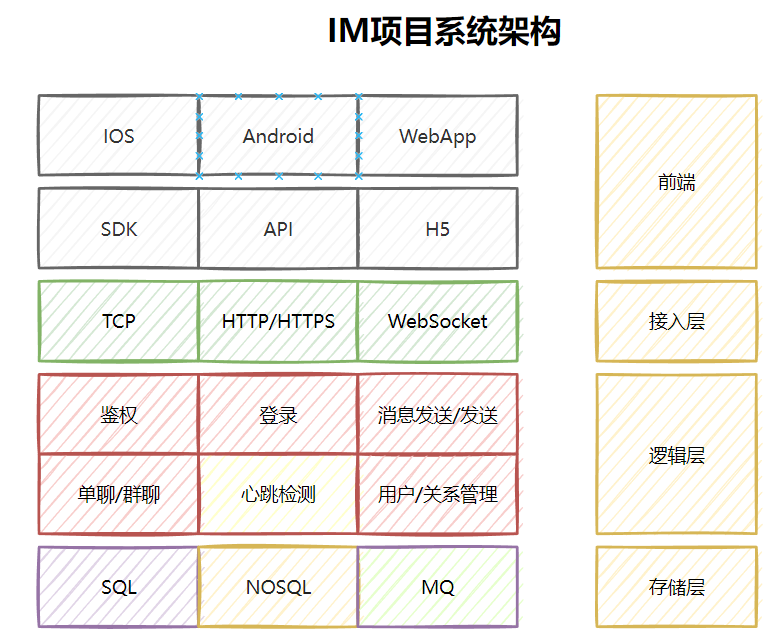
项目流程图: